If you use Pinterest, you are already aware of the huge AI flood we’ve been getting there in the last few years. Personally, I hate those because when I use Pinterest, I’m looking for inspiration and there’s nothing better than human made art to inspire us. But always having to manually filter out AI posts (which didn’t work to get rid of them) and getting disappointed whenever I found some cool image but noticing it’s actually AI made on a closer look was really making me want to ditch Pinterest once and for all.
That being said, I noticed recently that some images had a flag when you opened them saying they were made or modified by AI, so I wondered that there must be a way to actually filter them out now that they’re being flagged, right? And that’s actually true! I’ll show you how:
While browsing your feed, find one of those AI generated images and click on the three dots that appear on the bottom right corner when you hover it. If it’s flagged as AI, it will show the option “See fewer AI art Pins”. Click on it and bada-bing-bada-boom, that’s all there is to it!
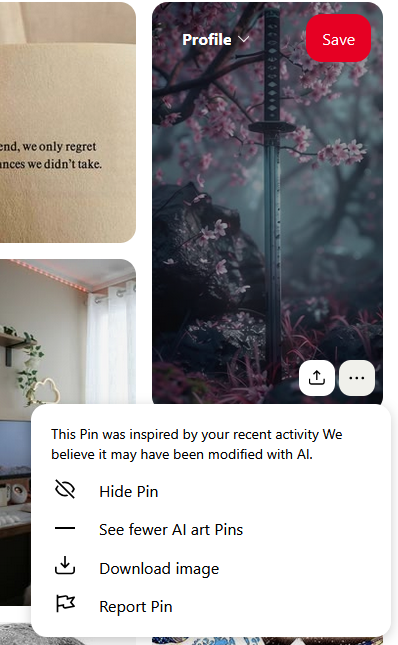
It will say that this change will take effect in a few hours but at least for me, i could see the difference right away. I even had to log in to my older account to take the screenshot above because i really wasn’t finding any AI flagged posts anymore in my main account. Unfortunately it’s still not perfect as I still found very few AI made posts that weren’t flagged and made their way to my feed, but they were mostly the Pixel Art ones that are really obvious when they are not human made.
I just made this change but it really made a difference in my feed, as I don’t need to keep an eye on what’s human made and what’s not when looking for inspiration. At least not as much anymore! It feels like browsing old Pinterest again, so I hope this helps my fellow Pinterest users.
If by any chance you don’t see this option, do a hard refresh (CTRL + F5) a few times and it should show up.
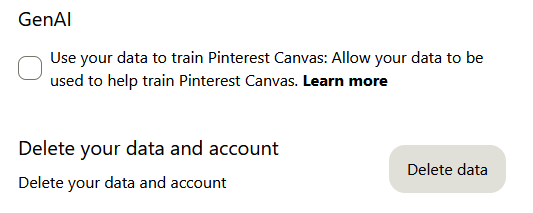
Bonus tip: Go to your Pinterest settings > Privacy and Data > and disable the Gen AI training option. This might be more useful to people who actually post their own content on Pinterest, but it’s always good to know this option is there.
Tell me in the comments if it worked for you!
Thanks for advice on keeping the internet clean ^w^
Thanks so much! I was hoping there might be some way to do it and we all know how useless the AI pins are
thx you for the helpful tip! glad that pinterest heard its users.
Isso foi uma excelente dica! Já vou aplicar no meu!